SmartSchool OS — AI-Powered School Operating SystemSmartSchool OS — AI-Powered School Operating System
FeaturesPricingAboutDocsSupport
LoginStart free
SmartSchool OS — AI-Powered School Operating SystemSmartSchool OS — AI-Powered School Operating System

One AI-powered operating system for school reports, exams, analytics, and growth — replacing spreadsheet chaos with clarity.

Start free

Product

  • Features
  • Pricing
  • Documentation

Resources

  • Get started
  • Support
  • About

Legal

  • Privacy Policy
  • Terms of Service

© 2026 SmartSchool OS. All rights reserved.

Powered by Globull

Documentation/Getting started

Workspace setup

Your workspace is the foundation of everything in SmartSchool OS. Get your school profile, calendar, and class structure right from the start.
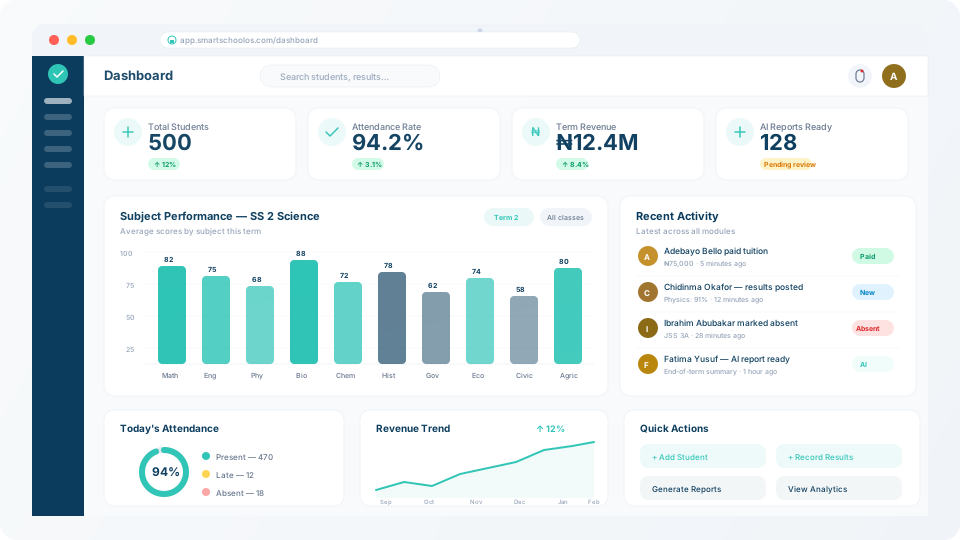
SmartSchool OS dashboard with configured workspace

School profile

Your workspace profile includes your school name, logo, address, and contact email. This branding is applied across report cards, parent notifications, and all exported documents.

  1. 1Navigate to Settings → School Profile.
  2. 2Upload your school logo (PNG or SVG, recommended 512×512px).
  3. 3Enter your school address, phone number, and official email.
  4. 4Click Save — your branding is live across the entire platform.

💡 Tip

Your logo and school name appear on every report card PDF. Make sure to use a high-resolution image.
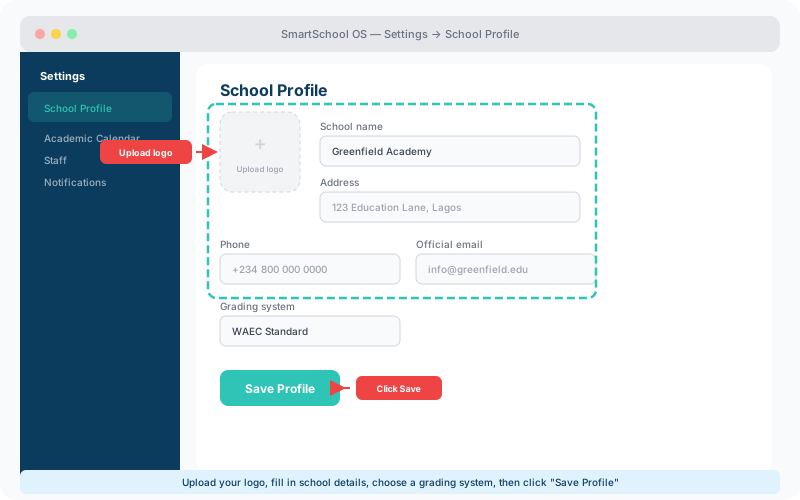
School profile form with logo upload area, name, address, phone, and grading system fields highlighted
The School Profile screen — upload your logo and enter school details. Click Save Profile when finished.

Academic calendar

Define your academic year structure — sessions, terms, and holidays. SmartSchool OS uses this calendar to scope exams, attendance records, and analytics dashboards automatically.

Sessions

The full academic year (e.g. 2025/2026). Create future sessions in advance.

Terms

Typically 3 per session. Each has start/end dates. Terms scope all data.

Holidays

Mark public holidays and mid-term breaks. Attendance auto-skips these dates.

Assessment windows

CA, mid-term, and final exams — each with configurable weight.

Department and class structure

Create departments (e.g. Sciences, Humanities, Commercial) and assign classes under them. Each class can have multiple sections, streams, or arms to match your school's structure.
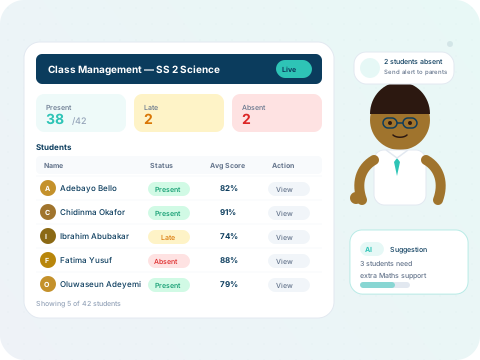
Teacher class management dashboard

Classes are the primary organising unit. Once created, you can assign a form teacher, link subjects, and enrol students — all from the class settings panel.

Customisation options

Tailor SmartSchool OS to your school's exact needs:

  • Grading scales — WAEC, NECO, or fully custom grade bands.
  • Comment banks — pre-written teacher/principal remarks for report cards.
  • Attendance rules — define "late" thresholds and absence alert triggers.
  • Billing cycles — termly, monthly, or per-event fee structures.

⚠️ Multi-campus note

All customisation is per-workspace. Multi-campus deployments can tailor settings independently for each branch.
← Quick-start guideNext: Inviting staff →