SmartSchool OS — AI-Powered School Operating SystemSmartSchool OS — AI-Powered School Operating System
FeaturesPricingAboutDocsSupport
LoginStart free
SmartSchool OS — AI-Powered School Operating SystemSmartSchool OS — AI-Powered School Operating System

One AI-powered operating system for school reports, exams, analytics, and growth — replacing spreadsheet chaos with clarity.

Start free

Product

  • Features
  • Pricing
  • Documentation

Resources

  • Get started
  • Support
  • About

Legal

  • Privacy Policy
  • Terms of Service

© 2026 SmartSchool OS. All rights reserved.

Powered by Globull

Documentation/Administration

Security settings

SmartSchool OS is built with enterprise-grade security. Here's what protects your data and how to configure security policies for your workspace.

Security settings and encryption overview

Authentication

Secure token-based authentication with multiple layers of protection:
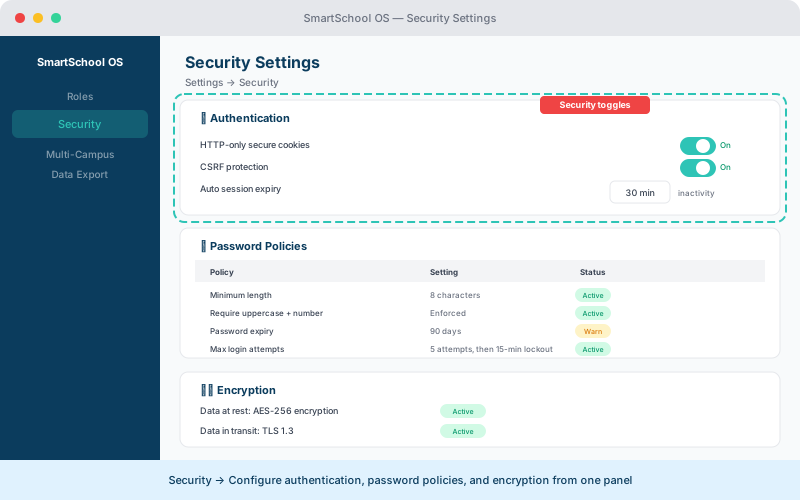
  • HTTP-only, secure cookies prevent XSS token theft.
  • Sessions expire automatically after a configurable inactivity period.
  • Admins can revoke any active session from the security panel.
  • CSRF tokens protect every state-changing request.
Security settings panel with authentication toggles, password policies, and encryption status
Configure authentication, password policies, and encryption from Settings → Security.

Password policies

Enforce strong password requirements from Settings → Security:

PolicyDefaultRange
Minimum length8 characters8–32
ComplexityMixed case + digitConfigurable
Lockout threshold5 failed attempts3–10
Expiration90 days30–365 or never

Data encryption

All data is encrypted both in transit and at rest:

In transit

TLS 1.3 for all HTTP traffic. SSL certificates for database connections.

At rest

AES-256 encryption for stored data. Encryption keys rotated periodically.

Security headers

The platform enforces strict browser-level protections:

  • Content Security Policy (CSP) — prevents XSS by restricting script sources.
  • X-Frame-Options — blocks clickjacking by preventing embedding in iframes.
  • Strict-Transport-Security (HSTS) — forces HTTPS for all connections.
  • X-Content-Type-Options — prevents MIME-type sniffing.

💡 Tip

Security headers are enforced automatically — no configuration needed. They cannot be weakened from the admin panel.


← Roles & permissionsNext: Multi-campus setup →