SmartSchool OS — AI-Powered School Operating SystemSmartSchool OS — AI-Powered School Operating System
FeaturesPricingAboutDocsSupport
LoginStart free
SmartSchool OS — AI-Powered School Operating SystemSmartSchool OS — AI-Powered School Operating System

One AI-powered operating system for school reports, exams, analytics, and growth — replacing spreadsheet chaos with clarity.

Start free

Product

  • Features
  • Pricing
  • Documentation

Resources

  • Get started
  • Support
  • About

Legal

  • Privacy Policy
  • Terms of Service

© 2026 SmartSchool OS. All rights reserved.

Powered by Globull

Documentation/Administration

Multi-campus setup

Running more than one campus? SmartSchool OS keeps each site's data fully isolated while giving School Admins a unified view across every location.
Multi-campus overview with connected school locations

Tenant isolation

Each campus is a fully isolated tenant:
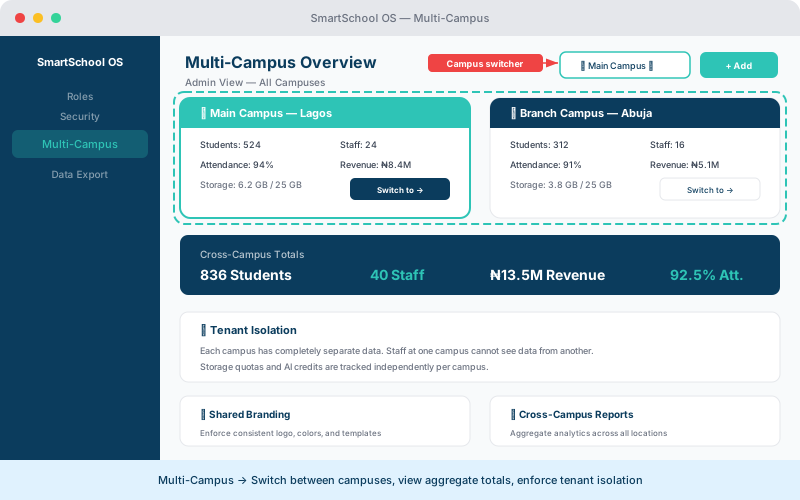
  • Separate student, staff, and financial data per campus.
  • Independent academic terms, grading scales, and settings.
  • No data leakage — even admins managing multiple campuses see only one at a time.
  • Per-campus storage quotas and AI credit pools.
Multi-campus overview showing campus cards, aggregate totals, and tenant isolation
Switch between campuses, view cross-campus totals, and manage each site independently.

Central governance

School Admins get a bird's-eye view of all campuses:

  1. 1Switch between campuses using the campus switcher in the sidebar.
  2. 2View aggregate analytics: total enrolment, attendance, and revenue across all sites.
  3. 3Monitor storage and AI credit consumption per campus.
  4. 4Manage billing centrally or delegate to individual campus admins.

Shared branding

Set organisation-level branding (logo, colours, report header) that all campuses inherit. Individual campuses can optionally override specific elements like their own logo or address.

💡 Tip

Set branding at the organisation level first. Campuses that don't need custom branding will automatically inherit the parent settings.

Cross-campus reporting

Generate consolidated reports spanning multiple campuses. Ideal for board meetings, regulatory filings, and strategic planning.

Enrolment summary

Total students across all campuses with year-over-year growth.

Financial overview

Revenue, outstanding fees, and expenses aggregated by campus.

Attendance comparison

Campus-by-campus attendance rates for quick benchmarking.

AI usage overview

Credit consumption across campuses to optimise allocation.

← Security settingsNext: Data export & backup →