SmartSchool OS — AI-Powered School Operating SystemSmartSchool OS — AI-Powered School Operating System
FeaturesPricingAboutDocsSupport
LoginStart free
SmartSchool OS — AI-Powered School Operating SystemSmartSchool OS — AI-Powered School Operating System

One AI-powered operating system for school reports, exams, analytics, and growth — replacing spreadsheet chaos with clarity.

Start free

Product

  • Features
  • Pricing
  • Documentation

Resources

  • Get started
  • Support
  • About

Legal

  • Privacy Policy
  • Terms of Service

© 2026 SmartSchool OS. All rights reserved.

Powered by Globull

Documentation/Student management

Attendance tracking

Track presence daily, spot trends early, and automatically include attendance data in every report card — all with real-time syncing.
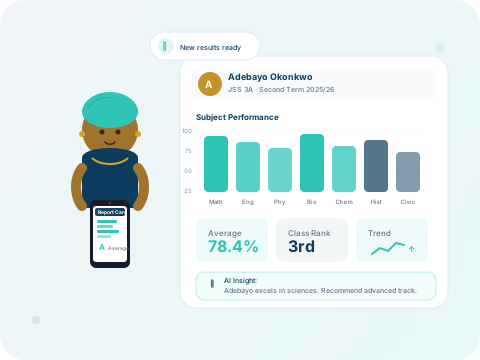
Attendance analytics and performance trends

Daily attendance marking

Teachers mark attendance from the class view. The interface shows the full roster with four status options:

✓ Present
✗ Absent
⏰ Late
✉ Excused

Attendance is saved in real-time — no submit button needed. Changes are instantly reflected on the admin dashboard.
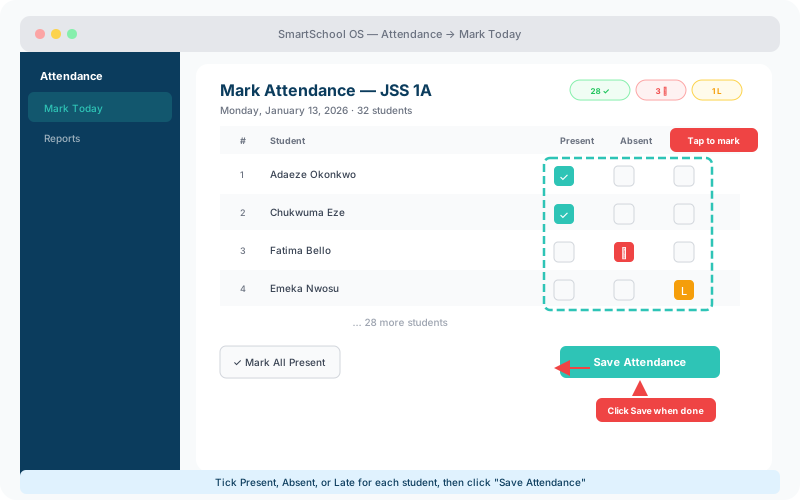
Attendance roster showing student list with Present, Absent, and Late checkboxes and Save button
The daily attendance view — tick Present, Absent, or Late for each student, then Save.

Attendance reports

Admins can view attendance dashboards filtered by class, date range, or individual student. Key reporting features:

  • Visual trend charts showing attendance patterns over weeks and months.
  • Class-level summaries with colour-coded attendance rates.
  • Export reports to CSV for external analysis or archiving.
  • Drill down into individual student records with day-by-day detail.

Absence alerts

Configure thresholds for automated absence alerts. When a student exceeds the configured number of absences in a term, the system:

  1. 1Flags the student record with a warning badge.
  2. 2Sends an in-app notification to the class teacher and admin.
  3. 3Optionally sends an SMS or email alert to the parent/guardian.

💡 Tip

Set different absence thresholds for junior and senior classes. Younger students often need closer monitoring.

Attendance in report cards

Attendance summary data is automatically pulled into generated report cards, showing:

MetricDescription
Days presentTotal school days the student attended
Days absentTotal school days missed
Days lateTotal days marked as late arrival
Attendance ratePercentage of school days attended
← Class assignmentNext: Parent portal →