SmartSchool OS — AI-Powered School Operating SystemSmartSchool OS — AI-Powered School Operating System
FeaturesPricingAboutDocsSupport
LoginStart free
SmartSchool OS — AI-Powered School Operating SystemSmartSchool OS — AI-Powered School Operating System

One AI-powered operating system for school reports, exams, analytics, and growth — replacing spreadsheet chaos with clarity.

Start free

Product

  • Features
  • Pricing
  • Documentation

Resources

  • Get started
  • Support
  • About

Legal

  • Privacy Policy
  • Terms of Service

© 2026 SmartSchool OS. All rights reserved.

Powered by Globull

Documentation/Analytics and billing

Revenue analytics

Track total revenue, monitor fee collection rates, identify payment trends, and export financial reports for your board or accountant.
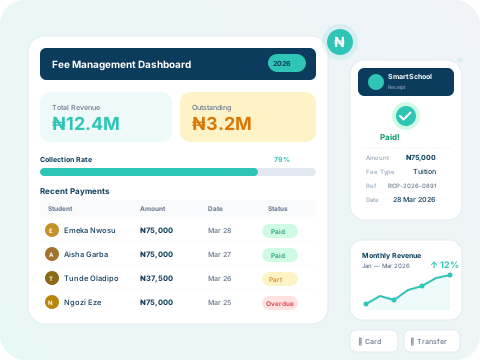
SmartSchool OS revenue analytics dashboard

Revenue dashboard

The analytics panel gives you a complete financial picture:

Total revenue

Cumulative income for the current session with term-by-term breakdown.

Collection rate

Percentage of expected fees actually received — track trends over time.

Outstanding fees

Total amount pending, broken down by class and student.

Revenue charts

Visual bar and line charts filterable by term, class, or date range.
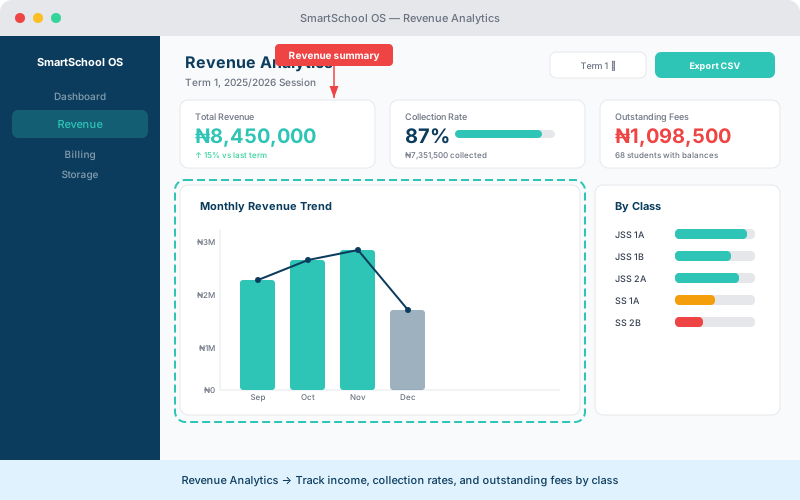
Revenue analytics dashboard showing income charts, collection rate, and outstanding fees by class
Track total revenue, collection rates, and outstanding fees — filter by term or class.

Fee collection tools

SmartSchool OS helps you close the collection gap:

  1. 1View outstanding balances per student from the Fees panel.
  2. 2Send automated payment reminders via SMS, email, or parent portal.
  3. 3Record payments manually or sync with online payment gateways.
  4. 4Generate collection reports for the finance team.

Period comparison

Compare revenue across terms or sessions to spot growth trends and seasonal patterns. The comparison view places two periods side by side with percentage change indicators.

💡 Tip

Use period comparison to prepare board reports — it clearly shows year-over-year fee collection improvement.

Exporting financial data

Export revenue data in two formats:

CSV export

Raw data for import into Excel, QuickBooks, or other accounting software.

PDF report

Formatted summary report suitable for board meetings and audits.

← Dashboard overviewNext: Storage management →