SmartSchool OS — AI-Powered School Operating SystemSmartSchool OS — AI-Powered School Operating System
FeaturesPricingAboutDocsSupport
LoginStart free
SmartSchool OS — AI-Powered School Operating SystemSmartSchool OS — AI-Powered School Operating System

One AI-powered operating system for school reports, exams, analytics, and growth — replacing spreadsheet chaos with clarity.

Start free

Product

  • Features
  • Pricing
  • Documentation

Resources

  • Get started
  • Support
  • About

Legal

  • Privacy Policy
  • Terms of Service

© 2026 SmartSchool OS. All rights reserved.

Powered by Globull

Documentation/Exams and results

AI report generation

Let AI write personalised narrative comments for every student in seconds — based on scores, attendance, and behavioural data.
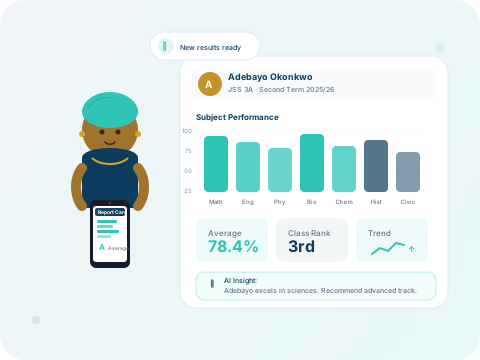
AI-generated student performance report

How AI reports work

After scores are finalised, SmartSchool OS generates personalised narrative comments for each student:
  1. 1Lock scores for the term (all subjects must be submitted).
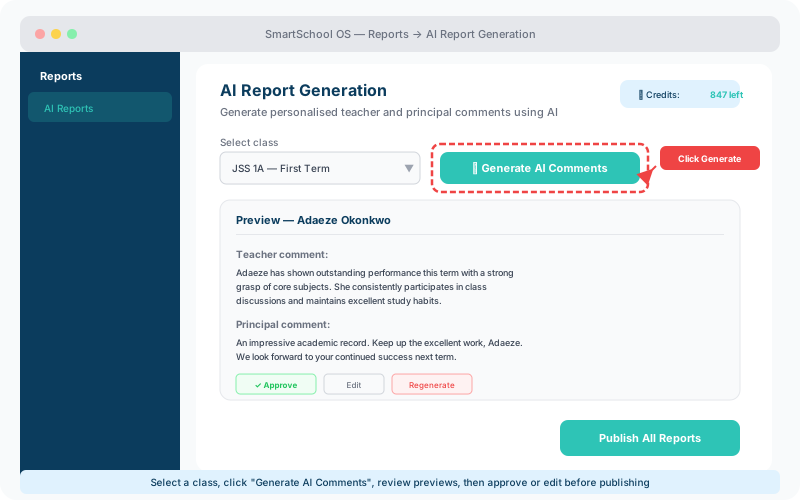
  2. 2Navigate to Reports → Generate AI Comments.
  3. 3Select the class or generate for all classes at once.
  4. 4AI analyses scores, attendance percentage, and behavioural notes.
  5. 5Personalised comments are drafted for teacher and principal remark fields.
AI report generation panel with class selector, generated comments preview, and action buttons
Select a class, generate AI comments, then approve or edit before publishing.

Customising the AI tone

Configure the AI's writing style to match your school's culture:

🎓

Formal

Academic language suitable for international schools and boards.

⭐

Encouraging

Growth-focused language that highlights strengths first.

⚖️

Balanced

Professional yet warm — the default for most schools.

💡 Tip

You can also provide custom prompt instructions to inject your school's specific phrasing, mottos, or values into AI-generated text.

Review and edit

AI-generated comments appear as editable drafts. Teachers retain full control:

  • Review each comment in context alongside the student’s scores.
  • Edit any comment manually to add personal observations.
  • Regenerate a single student’s comment if it needs a different angle.
  • Approve all comments in bulk once satisfied.

Credit usage

Each AI-generated report consumes credits from your plan allowance. Monitor usage from the AI dashboard, which shows remaining credits, usage history, and estimated reports remaining.

⚠️ Note

Regenerating a comment for the same student uses an additional credit. Encourage teachers to batch-review before regenerating.


← Score entryNext: Report card templates →